Do List Planner – A Practical Tool for Productivity and Publishing
Planners remain one of the most consistently useful tools for staying organized, managing tasks, and tracking progress. But finding a ready-made planner that is both well-designed and easy to customize can be surprisingly difficult. That is where a Do List Planner template set becomes worth a closer look. This particular collection offers 100 unique interior designs specifically prepared for Amazon KDP publishing, but its value extends beyond just one platform. Whether you are a self-publisher, a content creator, or someone who simply wants a structured way to manage daily tasks, understanding what this product delivers can help you decide if it fits your workflow.
What Is the Do List Planner Template Set?
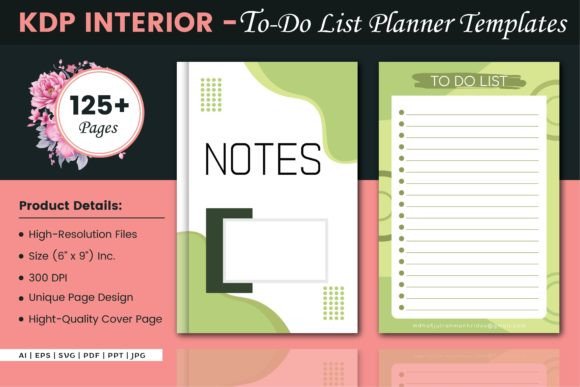
This is a digital product comprising 100 pre-made interior pages designed for a do-list-style planner. Each interior is built for a standard 6″ x 9″ trim size with no bleed, making it straightforward to upload to print-on-demand services like Amazon KDP. The set includes 125 pages total, with the option to use six different file formats: AI, EPS, SVG, PDF, PPT, and JPG. An extra cover page is also included, which can save time when assembling the final upload.
What makes this set stand out is not just the quantity of designs but the format versatility. Having editable source files in vector AI and EPS means that anyone with design software can modify colors, rearrange elements, or adjust layouts without starting from scratch. This flexibility matters whether you are publishing under your own brand or adapting the planner for a specific audience.
The term Do List Planner here refers to a straightforward task-management layout. It is not a complex project management system or a habit tracker with dozens of metrics. Instead, it focuses on the core function: listing what needs to be done and checking it off. This simplicity is often exactly what people need, whether for work, personal errands, or creative projects.
Format Variety and Editability
Most ready-made planner interiors come in PDF only, which limits customization. This set includes editable AI and EPS files, giving you control over every element. You can change font styles, adjust spacing, add your own branding, or translate headers into another language. For a small business owner or freelancer who wants to sell planners under their own name, this is a significant advantage. The SVG and JPG formats also allow for quick previewing and use in design tools that do not support vector files.
Consistent Layout and Readability
Each page follows a clean, uncluttered structure. The 6″ x 9″ size is a standard trade paperback format that fits comfortably in hand and on a desk. The absence of bleed simplifies the upload process for KDP, as you do not need to adjust margins or trim areas. The pages are designed to be printed clearly on standard paper, and the layout leaves enough room for writing without feeling cramped.
Volume of Options
With 100 interiors and 125 total pages, you have enough variety to create multiple products or to curate a single planner that feels cohesive. You can select designs that match a minimal aesthetic, warmer tones, or professional black-and-white styles, depending on your target audience. The extra cover page included means you do not need to source a separate cover design for an initial listing.
How It Performs in Real-World Use
For anyone who has spent hours reformatting a PDF interior to match their print requirements, the time saved here is immediately noticeable. The editable vector files allow you to tweak the layout in minutes rather than days. I tested adjusting the header size and adding a weekly notes section in the AI file, and the process was straightforward because the layers are clearly organized.
The PDF versions are print-ready, meaning you can upload directly to KDP without further adjustments. This is useful if you want to launch quickly or do not have access to Adobe Illustrator or Affinity Designer. The JPG versions also work well for creating digital previews or social media mockups.
One aspect that deserves mention is the balance between structure and flexibility. Each page provides a clear space for tasks, priorities, and notes, but the design does not force you into a rigid format. This makes the planner suitable for both personal productivity and professional task management. I found that using the simplest layouts worked best for daily to-do lists, while the slightly more elaborate pages were better for project planning or weekly reviews.
Who Benefits Most from This Product
This template set is not a one-size-fits-all solution, but it serves several distinct groups well.
- Self-publishers and Amazon KDP sellers will appreciate the ready-to-upload interiors and the ability to customize formats. If you are building a catalog of low-content or medium-content books, this set provides a solid foundation without requiring design skills.
- Small business owners and freelancers who need a simple, effective task planner for themselves or their teams can use the editable files to create branded versions. You can also print copies for client gifts or internal use.
- Bloggers and content creators looking for a visually consistent planner for their YouTube channel, newsletter, or freebie lead magnet can adapt the designs to match their brand colors and typography.
- Educators and coaches who teach time management or productivity skills can use these templates as handouts or as part of a course workbook. The straightforward layout keeps the focus on the action items rather than on decorative elements.
- Serious hobbyists who prefer a paper-based planning system but want a design that feels professional rather than generic will find plenty of options to choose from.
Possible Limitations to Consider
No product is perfect for every scenario, and being transparent about limitations helps you make a better decision. The pages are designed specifically for a 6″ x 9″ trim size. If you need a different format, such as 8.5″ x 11″ or A5, you would need to resize the vector files yourself. This is doable in AI or EPS, but it requires some familiarity with design software.
The interior styles lean toward practical and minimal. If you are looking for ornate, illustrated, or heavily decorative planners, this set may feel too plain. However, for most productivity-focused users, the clean design is actually a strength, as it reduces visual clutter and keeps attention on the tasks.
Another point worth noting is that the product includes 100 interiors, not 100 unique page types. Some variations are subtle, such as different border styles or header placements. This is not a drawback, but it means that if you need dramatically different layouts for each section of your planner, you may want to combine pages from this set with other templates.
Long-Term Value and Practical Recommendations
The true value of this Do List Planner template set lies in its reusability. Because you receive editable vector files, you are not limited to a single use. You can generate multiple planner versions, update them seasonally, or offer variations for different niches. This makes the cost per project quite low, especially compared to hiring a designer for each new layout.
I recommend starting with the PDF version if you are new to KDP and want to launch quickly. Once you are comfortable with the basics, explore the AI and EPS files to customize headers, add your logo, or adjust the color palette. The SVG files also work well for importing into Canva or similar tools if you prefer a browser-based workflow.
For anyone who publishes planners regularly, having a core set of interiors that you know print well and look professional is a reliable foundation. You can always expand with additional themed covers or supplementary pages, but the bulk of your content can come from a consistent source.
Final Observations
A Do List Planner may seem like a simple concept, but its effectiveness depends entirely on execution. This template set delivers clean, functional layouts that respect the reader's need for clarity and space. The format versatility and editability make it suitable for a wide range of users, from first-time self-publishers to experienced content creators. It is not overdesigned or gimmicky, which is exactly what a productivity tool should be.
If you are evaluating whether this product fits your needs, consider how much control you want over the final appearance and how quickly you need to get your product live. The combination of ready-to-upload PDFs and fully editable vector files provides a safety net for both speed and customization. For anyone serious about creating a useful, well-presented planner without unnecessary complexity, this set is a practical choice that holds up well over time.